Most analytics tools make audience segmentation harder than it needs to be. Buried menus, complex setup and data already incomplete because visitors rejected your cookie banner. Plausible skips the consent layer entirely: no cookies means complete data, and every filter is one click on the dashboard.
- What is audience segmentation?
- What a web analytics tool can reveal about audience segmentation
- How to segment your audience in Plausible
- Making the most of Plausible for audience segmentation
- Why Plausible works well for audience segmentation
What is audience segmentation?
Plausible gives you reliable data on visitor traffic, but raw numbers alone are hard to act on. Audience segmentation is how you make sense of them: filtering your visitor data into groups that can be studied to answer real business questions and inform decisions. You might also see this called customer segmentation, traffic segmentation or behavioral segmentation, but the practice is the same across all three.
The depth of analysis varies by use case. An independent journalist might want unique visitors segmented by city, to understand where interest in their work is strongest. A SaaS team might look at which audience segments convert, and which channels those visitors came from. A large e-commerce platform might track full customer journeys across product categories and campaigns.
If you run any kind of website, you already have audience segments whether you have looked at them or not. Let’s explore what a web analytics tool can show you.
What a web analytics tool can reveal about audience segmentation
No matter the depth of analysis, any segment is built from some combination of three basic questions:
- How did the audience find us (channels of acquisition, marketing campaigns)?
- What they were like (devices used, demographics they come from)?
- What they did on the site (pages visited, actions taken, conversions met, etc.)?
In a web analytics dashboard like Plausible, these common audience insights take the shape of:
- Geographic segmentation
- Traffic acquisition segmentation
- Technological segmentation: devices, browser, OS data
- Behavioral segmentation: page views, events and engagement data
This helps answer important business questions. For example, “How many visitors from the United States signed up last year?” or “Is our site more popular with mobile users or desktop users in Germany?” or “Do the visitors reaching our site from X (Twitter) visit the pages we want them to?”
By answering such questions, you can make decisions based on real data. Say, you identify that, for your e-commerce store, mobile traffic has spiked over the last six months while cart abandonment has also been high. You may want to invest in improving your mobile experience.
Or say you find that visitors from the UAE are engaging heavily with a new feature. That is a clear signal to focus your marketing campaigns there.
But getting there first requires breaking your audience data into segments that can actually be compared.
Combining the UAE segment with the landing pages they visit most shows which content is driving that interest, a connection the raw numbers alone would not reveal.
In Plausible, this is as simple as applying a few filters on your dashboard.
How to segment your audience in Plausible
In Plausible, your audience data is already presented in basic segments like channels of acquisition, landing pages they visit, their demographics and the devices they use. This is all available by default.
When you have a Plausible dashboard open, clicking on any entry (or entries) filters the dashboard to show only data matching those filters. You can also save a segment for quick access later.
If you don’t have a Plausible account yet, you can explore our live demo where our own website’s real data is publicly available. The examples below use that same dashboard, and you can try each filter combination yourself.
Example: Free Trial visitors from Twitter, USA (excluding CO, MN, AZ)
If we wanted to segment the audience that came to our Free Trial registration page, from Twitter, from the USA (but excluding the regions of Colorado, Minnesota and Arizona because we ran paid ads in those regions and only want to understand organic traffic), in the year so far, then we would get this:
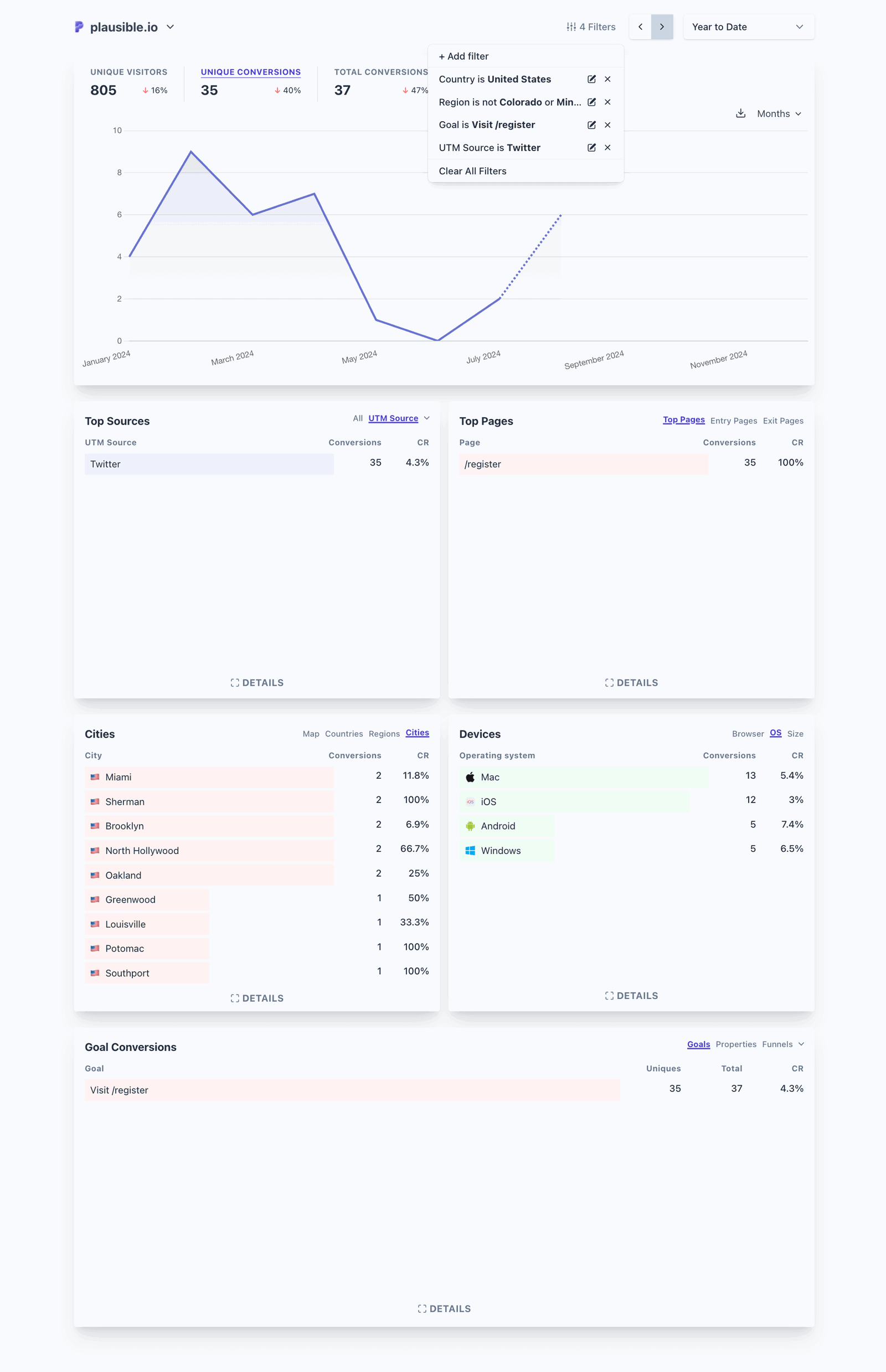
You can explore this exact segment on our filtered live dashboard.
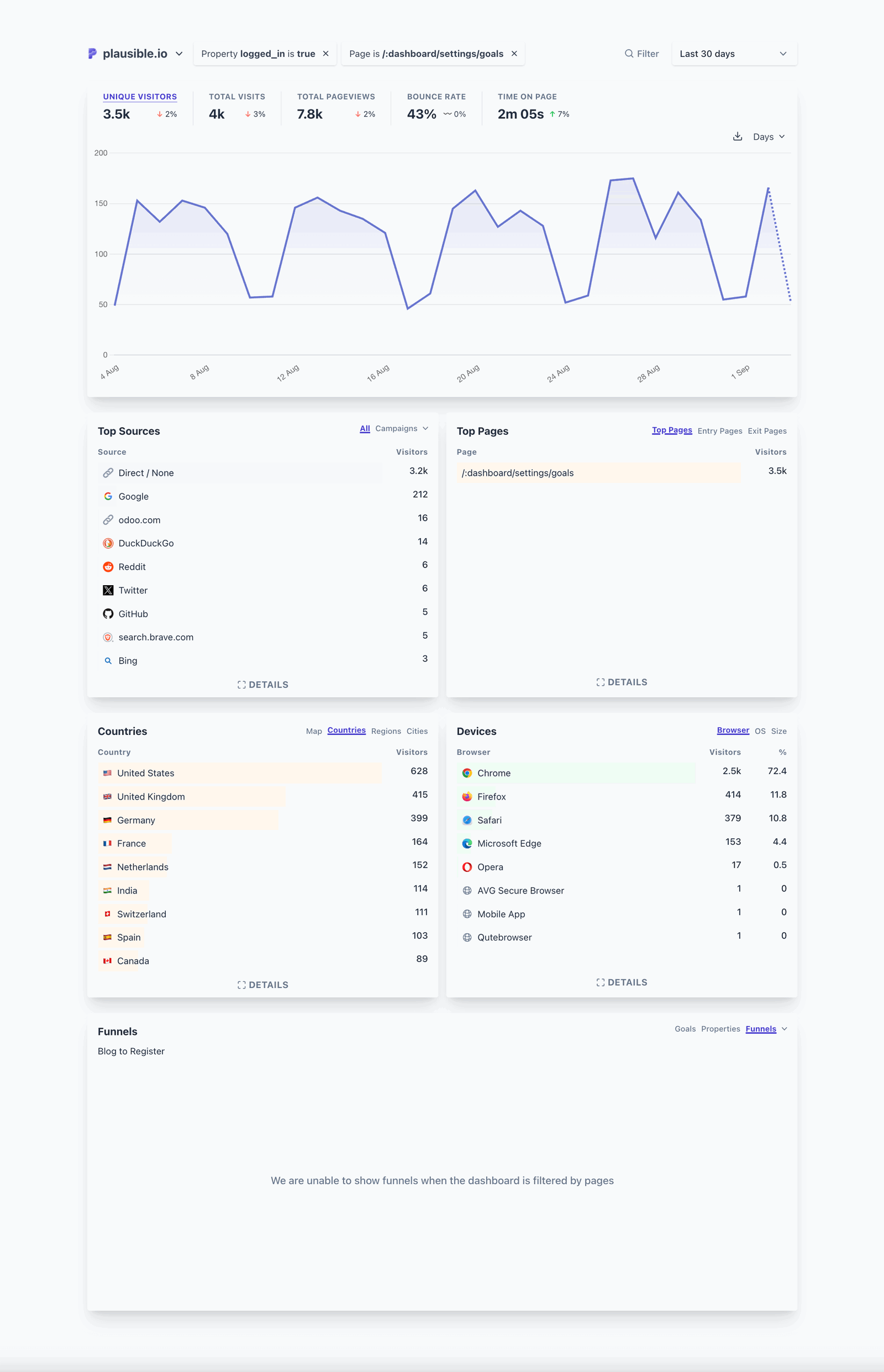
Example: Logged-in users who viewed the Goals Settings page
Filtering by active users (a custom property) and the Goals Settings page (a Top Pages entry) shows how many people are interested in setting up the feature, or are at least aware of it.
From there, we can improve the feature experience or adjust how we market it.
Example: UK users who upgraded to paid subscription, in the year so far
This segment tells us how many paid subscriptions (a custom goal) we got from the United Kingdom in the year so far, and what the conversion rate looks like.
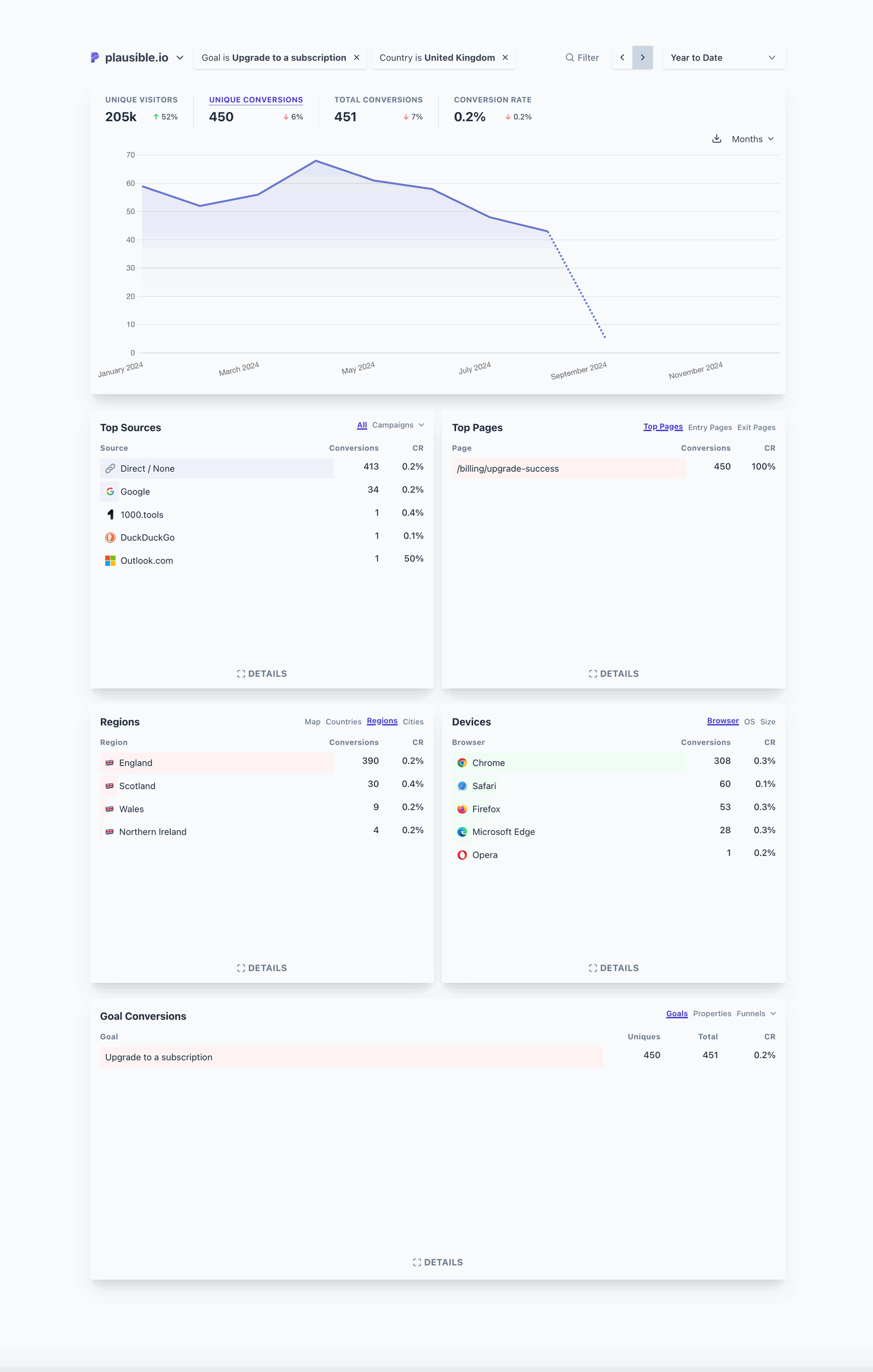
Looking deeper at this report reveals more. For example, we can see that England drove the most conversions from the United Kingdom, and that Chrome has been the most popular browser.
If we wanted to run an ad campaign, we could target by those two factors directly. Without this data, we would be spending budget on audiences less likely to convert.
Example: Author page views
A simpler use case: understanding which blog authors (tracked as a custom property) generate the most page views and on which posts. This gives a clear picture of writing effectiveness.
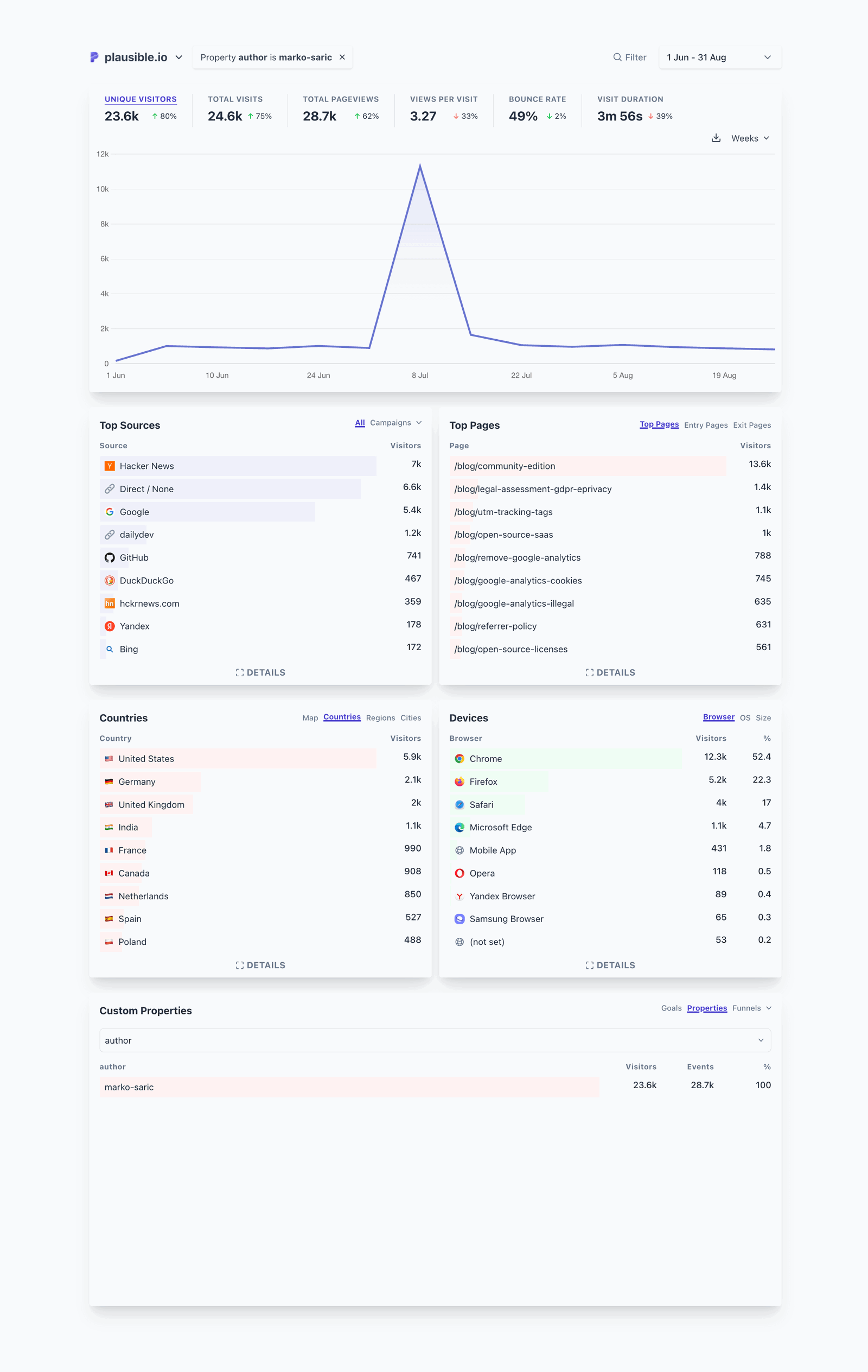
You can also see which pages rank for which keywords from Google. More on that below.
More segment ideas
The examples above cover a few common use cases. Here are additional segment types worth exploring:
- Campaign segment: filter by utm_campaign and a conversion goal to compare how individual campaigns drove sign-ups or purchases and which had the strongest return.
- E-commerce segment: combine a purchase event with traffic source and device type to see where buyers come from and on what devices they convert.
- SaaS signup segment: pair a free trial sign-up event with country and referral source to find which regions and channels bring in the most qualified leads.
- Content segment: filter by a page path prefix or a custom Author property to see which content types or writers generate the most engagement and downstream conversions.
Tracking on-site interactions, campaign contributions and SEO performance requires some additional setup since it varies by use case. Here are the practices we recommend.
Making the most of Plausible for audience segmentation
Here is what to configure to go deeper than the default segments.
For segmenting by traffic source: tag your campaigns
Use campaign parameters to segment traffic without building profiles or tracking people. Plausible captures campaign parameters automatically and uses them to group your dashboard statistics. No cookies, no user profiles, no cross-site tracking.
When sharing links on social media, in paid ads or newsletters, tag them with query parameters like ref, source, utm_source, utm_medium, utm_campaign, utm_content and utm_term.
The segmented data appears under the “Sources” tab. Click any entry to filter the whole dashboard to that source, combine multiple sources, or adjust the timeframe.
This gives you campaign attribution without the surveillance infrastructure GA4 relies on.
For segmenting by on-site actions: set up custom events
Custom events let you segment by what visitors actually do. Track specific actions like signing up for a newsletter, clicking a call-to-action or downloading a file.
Plausible offers several ways to track events, some without any code edits: enhanced measurements, pageview goals and custom event goals.
You can also collect additional context about events with custom dimensions to create custom metrics, and compose goals into funnels to measure drop-off across a defined conversion sequence, or trace the paths visitors actually take with user journeys.
You get a clear picture of what drives conversions without collecting personal data about who did it.
For segmenting by SEO performance: connect Google Search Console
We offer an integration with Google Search Console that shows you the search terms that brought visitors to your site, directly inside your Plausible dashboard.
You can segment this data by filtering your dashboard with the “Google” traffic source entry to see which keywords drive real clicks.
No additional Google code on your site and no new data collected from your visitors. Google provides search data they already have; your site does not send anything extra.
Other optimizations
- Save your segments for quick access later.
- If you have historical data in Google Analytics 4 that you don’t want to lose, you can import it into Plausible. This keeps your data intact for long-term trend analysis and audience comparisons.
- You can allow traffic only from specific hostnames to not pollute your data.
- Plausible strips query parameters from page reports for privacy. If you want specific pages reported with their full URL including the query string, you can configure that here.
Why Plausible works well for audience segmentation
Plausible is built on the idea that analytics should not require a learning curve, a privacy lawyer or a consent banner. See what straightforward web analytics actually looks like.
Plausible’s private-by-design solution is fully compliant with GDPR, CCPA and PECR regulations. We operate without cookies or persistent identifiers and don’t collect personally identifiable information. Your data is never sold, never shared and never used for advertising.
Unlike GA4, Plausible does not track or sell user behavior, so you can skip cookie banners. No consent popup means no data loss from visitors who would have declined.
Our tracking script is lightweight, which prevents the slowdowns caused by heavier scripts and is good for SEO.
We also filter out referrer spam and data center traffic, and accurately attribute mobile traffic from apps like Gmail and Slack. We exclude ~32K data center IP ranges by default, which covers a large share of known bot traffic and prevents it from inflating your stats.
For example, Cookiebot CMP users see a constant spike in their direct traffic because their sites are scanned constantly by the Cookiebot’s bots, requiring manual exclusions in GA4. There are other similar cases, but Plausible handles them all automatically.
We are also blocked far less often than Google Analytics by ad blockers and privacy-focused browsers like Safari and Firefox.
How Google Analytics 4 handles audience segmentation
Google Analytics 4 buries audience segmentation behind layers of menus. “Audiences” starts as a setting hidden in a complex settings panel and ends up in the “Free Form” reports.
In GA4, you can create audience groups based on user behavior and use them for things like retargeting ads in Google Ads.
The problem is that third-party cookie deprecation has made this whole approach unreliable. Even though the phase-out has been delayed, most users still reject cookies, which keeps the issue very much alive. We’ve covered these issues in more detail in another article.
Moreover, recent independent studies have shown that the data tracked in Google Analytics is not accurate, missing up to 55% of traffic compared to Plausible.
GA4 is not GDPR-compliant, is known to profile your users and sell their data, requires a learning curve and compromises the user experience. We cover the full comparison between Plausible and Google Analytics in detail.
Plausible is trusted by 21,000 teams including Mozilla, Hugging Face, Ghost, Basecamp and Home Assistant. Try it free for 30 days, no credit card required. Run it alongside Google Analytics and see how the audience numbers compare when data is complete.